


Brother
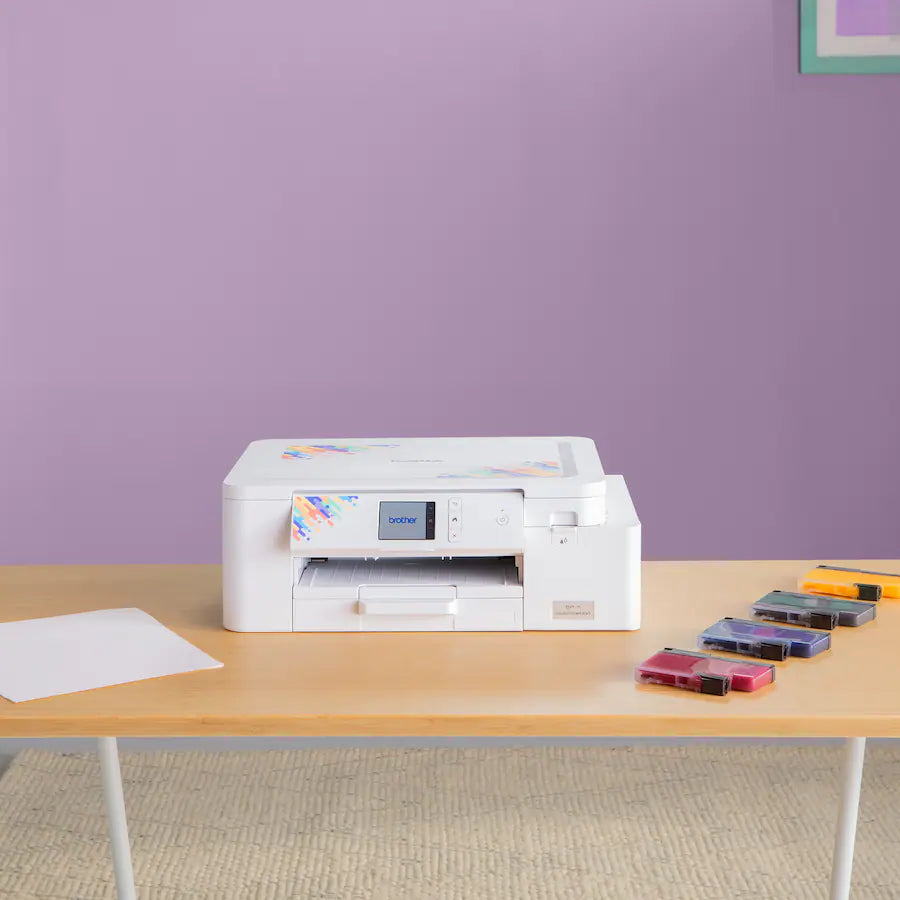
Brother SP1 Sublimation Printer
Brother SP1 Sublimation Printer
SKU: SP1
Couldn't load pickup availability
Wireless sublimation printing with Artspira app
Print vibrant designs on shirts, mugs, tumblers, and more. Heat press required (sold separately).
- Works with Artspira app for wireless design transfer
- Full CMYK ink set included (47ml each color)
- Compact size: 17.1" x 13.5" x 6.2"


Brother SP1: Sublimation Printing for Custom Projects
The Brother SP1 Sublimation Printer prints vibrant, smudge-resistant designs for transfer onto polyester fabrics and polymer-coated items. Customize shirts, mugs, tumblers, coasters, and home décor with bold color that lasts. The printer connects wirelessly to the Artspira app for design editing and transfer. A heat press is required for sublimation (sold separately).
Artspira App Integration
Edit, customize, and send designs directly to the SP1 via the Artspira app. Access over 100 free sublimation designs, use AR functionality to preview designs on items, convert images for printing, and create poster-style projects. Snap a photo, adjust the design, and print.
Genuine Brother Sublimation Ink
The SP1 uses Genuine Brother Sublimation Ink for bold, long-lasting prints. The included full-size ink set (47ml CMYK) delivers consistent, vibrant results.
Shop Brother Sublimation Printer Ink
Shop Brother Sublimation Printer Paper
Compact Design
At just 17.1" (W) x 13.5" (D) x 6.2" (H), the SP1 fits comfortably on a desk or craft table without taking over your workspace.
What's in the Box
- Brother SP1 Sublimation Printer
- Full-size Brother Genuine Sublimation Ink set (47ml CMYK)
- 10 sheets of Sublimation Paper (SP01PLS)
- Quick Reference Guide
- Artspira QR Code for app download
Required Accessories
A heat press is required to transfer printed designs onto your materials. Heat press sold separately.
Browse the full Brother collection for machines and accessories.
Specifications
| Workspace & Display |
|
| Smart Features |
|
| Print Performance |
|
| Ink System |
|
| What's Included |
|
| Compatible Materials |
|
| Warranty |
|
Frequently Asked Questions
What is the Brother SP1 and how does sublimation printing work?
Sublimation printing uses heat-activated ink that transfers from special sublimation paper directly into polyester fibers or polymer-coated surfaces. The Brother SP1 is a dedicated sublimation printer built for crafters and small businesses. The process requires sublimation ink, sublimation paper, and a heat press. The result is a permanent, full-color print that won't crack, fade, or peel.
What materials can I print on with the Brother SP1?
The SP1 works on polyester fabrics and polymer-coated hard goods. Common uses include custom t-shirts, tote bags, mugs, mousepads, and phone cases. The substrate must be at least 65% polyester for best results. Natural fabrics like cotton do not work with sublimation.
What supplies do I need along with the SP1?
You'll need sublimation ink, sublimation transfer paper, and a heat press (sold separately). Quality Sewing carries Brother sublimation ink and sublimation paper designed for use with the SP1.
How is sublimation printing different from embroidery?
Sublimation transfers dye into the fabric surface to create a printed image. Embroidery stitches thread directly onto fabric for a raised, textured finish. Both are popular for custom apparel and gifts, but they require different machines and techniques. If you're exploring embroidery, we carry a full range of embroidery machines from leading brands.
Can I use the Brother SP1 with embroidery design software?
No. The SP1 uses its own included printing software and is not compatible with embroidery formats like .PES or .DST. For embroidery digitizing or design work, you'd need a separate embroidery machine and software. Browse our Brother sewing and embroidery machines if you're looking to add embroidery to your setup.
Does Quality Sewing offer classes on sublimation?
Yes. We offer an Artspira & Sublimation Class covering printing setup, material selection, and heat press settings. It's a solid starting point for anyone new to sublimation or looking to get more out of their machine.